Run Your Entire Interior Design Business. One App.
Leads, GST quotations, projects, site updates, payments, attendance and payroll, on your team's phones and on your laptop. Just tell Flowmate AI what happened and it does the data entry.
Your Team Should Build Beautiful Spaces. Not Manage Everyday Complexity.
Every day starts with answering client calls, checking WhatsApp for vendor updates, following up on delayed materials, tracking payments, scheduling site visits and coordinating multiple teams across projects.
As your business grows, so does the chaos.
FlowBriq brings every moving part of your business into one connected workspace, so your team spends less time coordinating work and more time delivering great projects.
Why FlowBriq
Built for Interior Designers. Not Construction Companies.
Most project management software is designed for construction projects. Interior design firms work differently.
You manage design revisions, client approvals, material selections, room-wise execution, vendor coordination and finishing work-not large-scale civil construction.
FlowBriq is designed around the way interior businesses actually operate.
The Difference
Less Firefighting. More Control.
Before FlowBriq
Client updates scattered across WhatsApp
Vendor information spread across calls
Payments tracked manually
Materials difficult to trace
Deadlines constantly shifting
Teams asking what to do next
After FlowBriq
Every project visible in one place
Vendors coordinated
Payments tracked
Teams aligned
Clients always informed
Complete operational visibility
Flowmate AI
One message. Zero data entry.
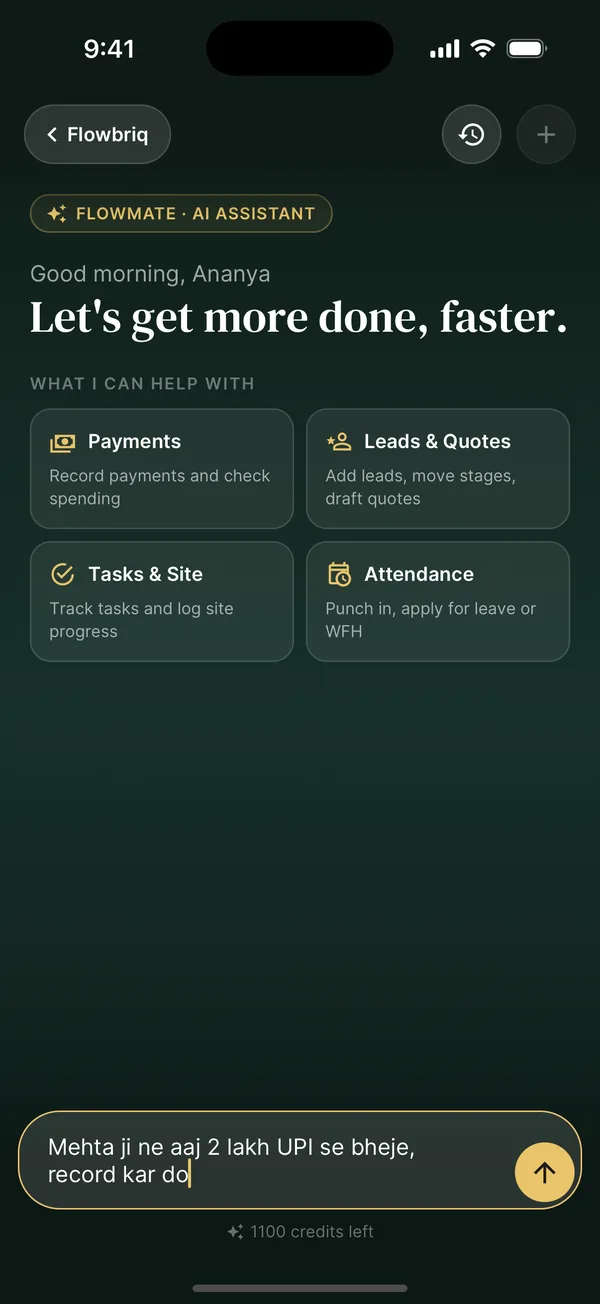
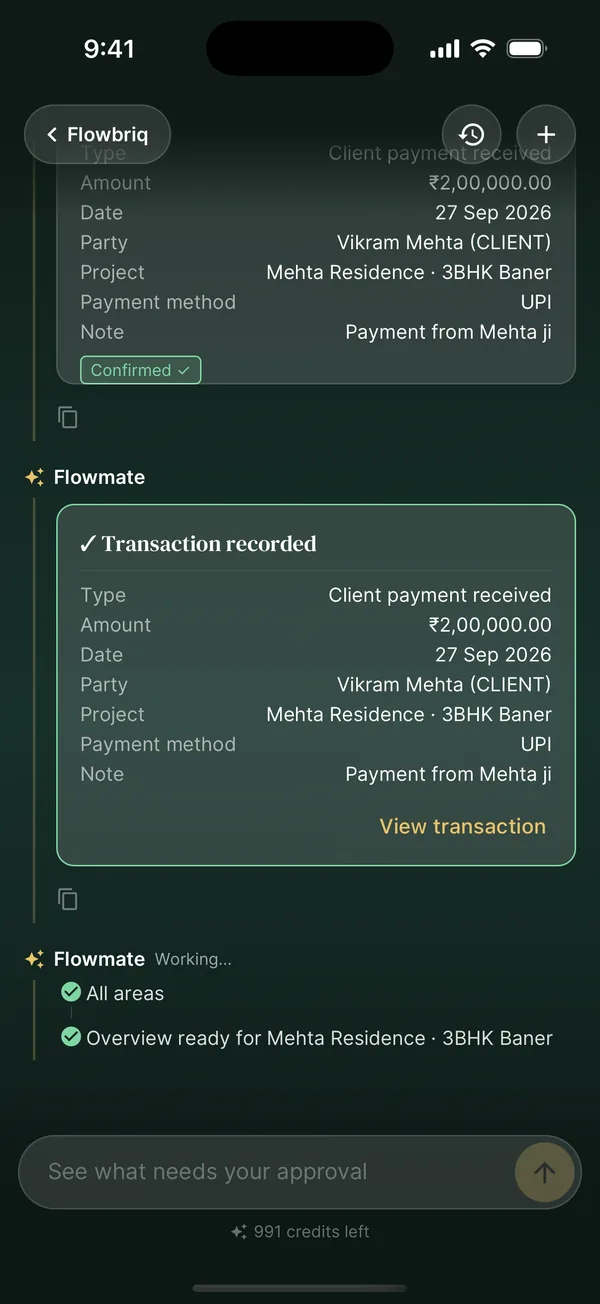
Flowmate is the AI assistant built into FlowBriq. Tell it about a payment, a new lead or a site update, and it prepares the entry for you to confirm. Ask it a question and it answers from your studio's live data.
01
Say it your way
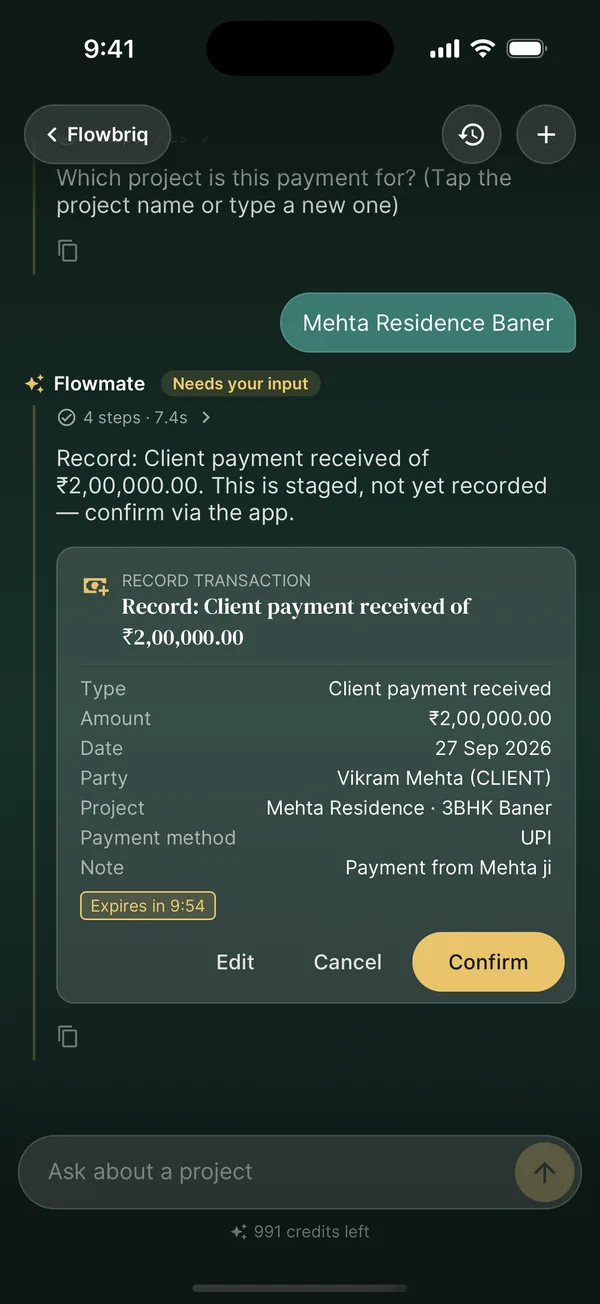
Type what happened in English or Hinglish, the way you would message your accountant.
02
Check the card
Flowmate fills in the amount, party, project and mode, then waits for your Confirm.
03
It is on the books
The transaction is recorded against the right project, and your team sees it instantly.
What Flowmate can do
Payments
Record client receipts, vendor payments and site spending.
Leads & quotes
Add leads, move stages, log follow-ups and draft quotes.
Tasks & site
Create and assign tasks, log site progress.
Attendance
Punch in, apply for leave or work from home.
Or just ask
“Who owes me money?”“Overdue follow-ups this week”“How is Mehta Residence doing?”
You stay in control
Nothing is saved until you tap Confirm
Asks for missing phone numbers and dates instead of guessing
Shows credits left and what each reply used
Included in every plan: 2,000 credits a month on Studio, 6,000 on Pro.
Inside the App
Every Tool Your Studio Actually Needs
Real screens from the FlowBriq mobile app. No mock-ups.
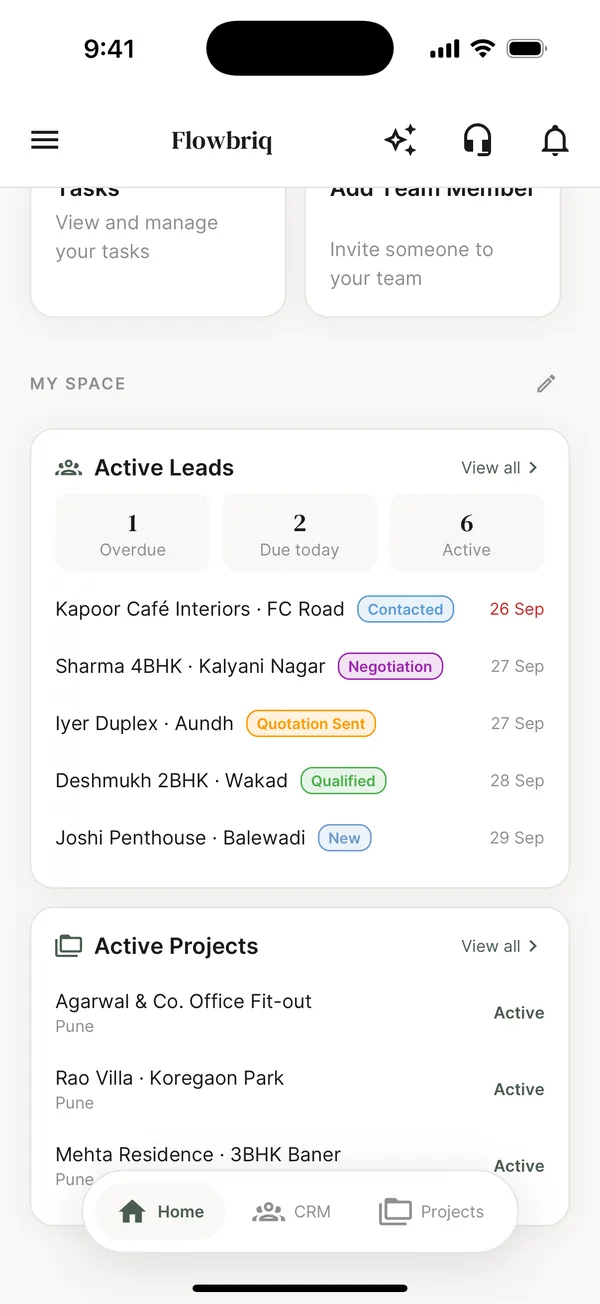
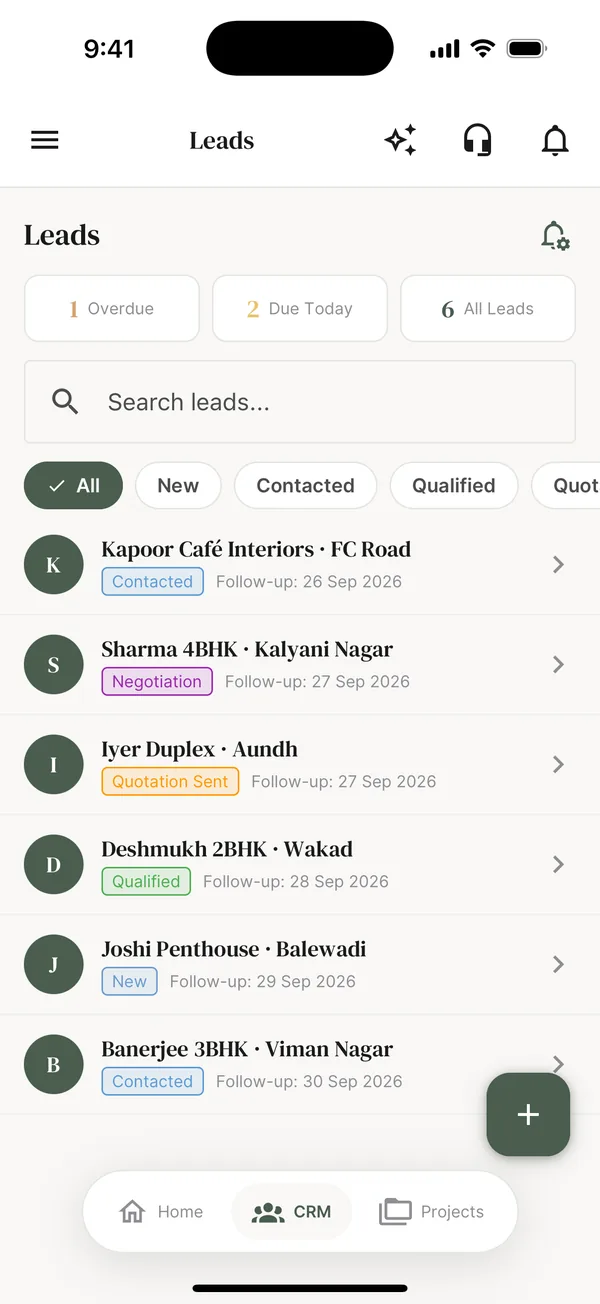
Never lose a lead to a missed follow-up
Every enquiry moves through a clear pipeline, from New to Contacted, Qualified, Quotation Sent and Negotiation, with overdue and due-today follow-ups at the top.
Call, SMS or WhatsApp a lead in one tap
Log site visits, calls and notes on a timeline
Assign leads to staff and get reminded on time
Convert a won lead into a project with its site pinned on the map
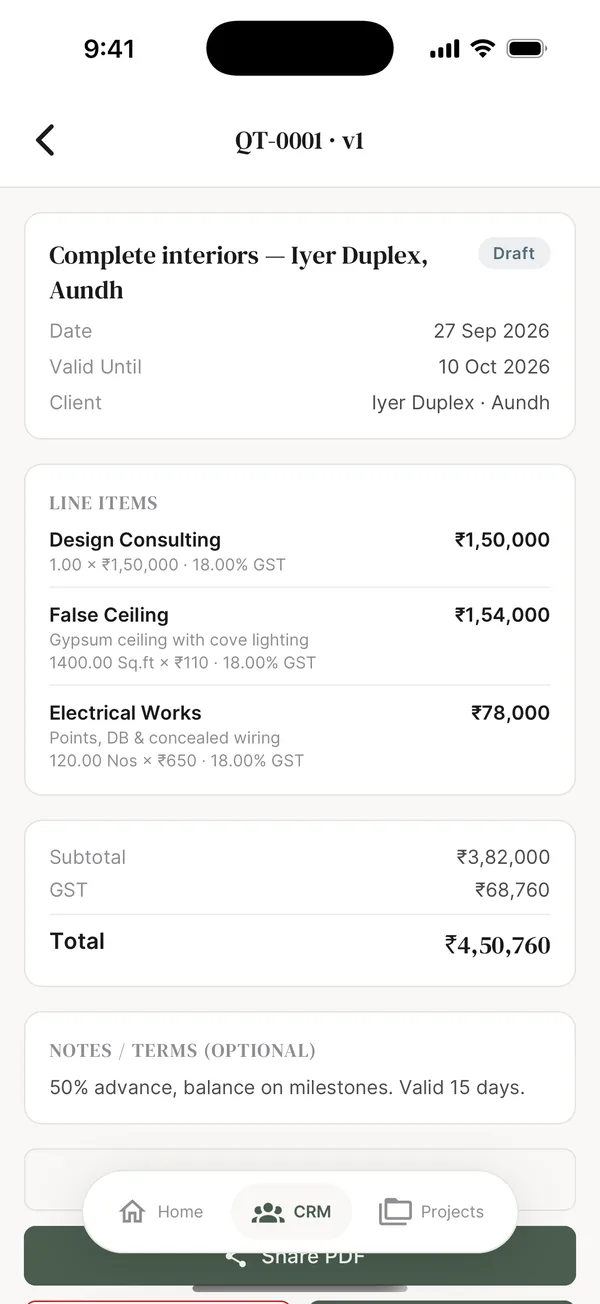
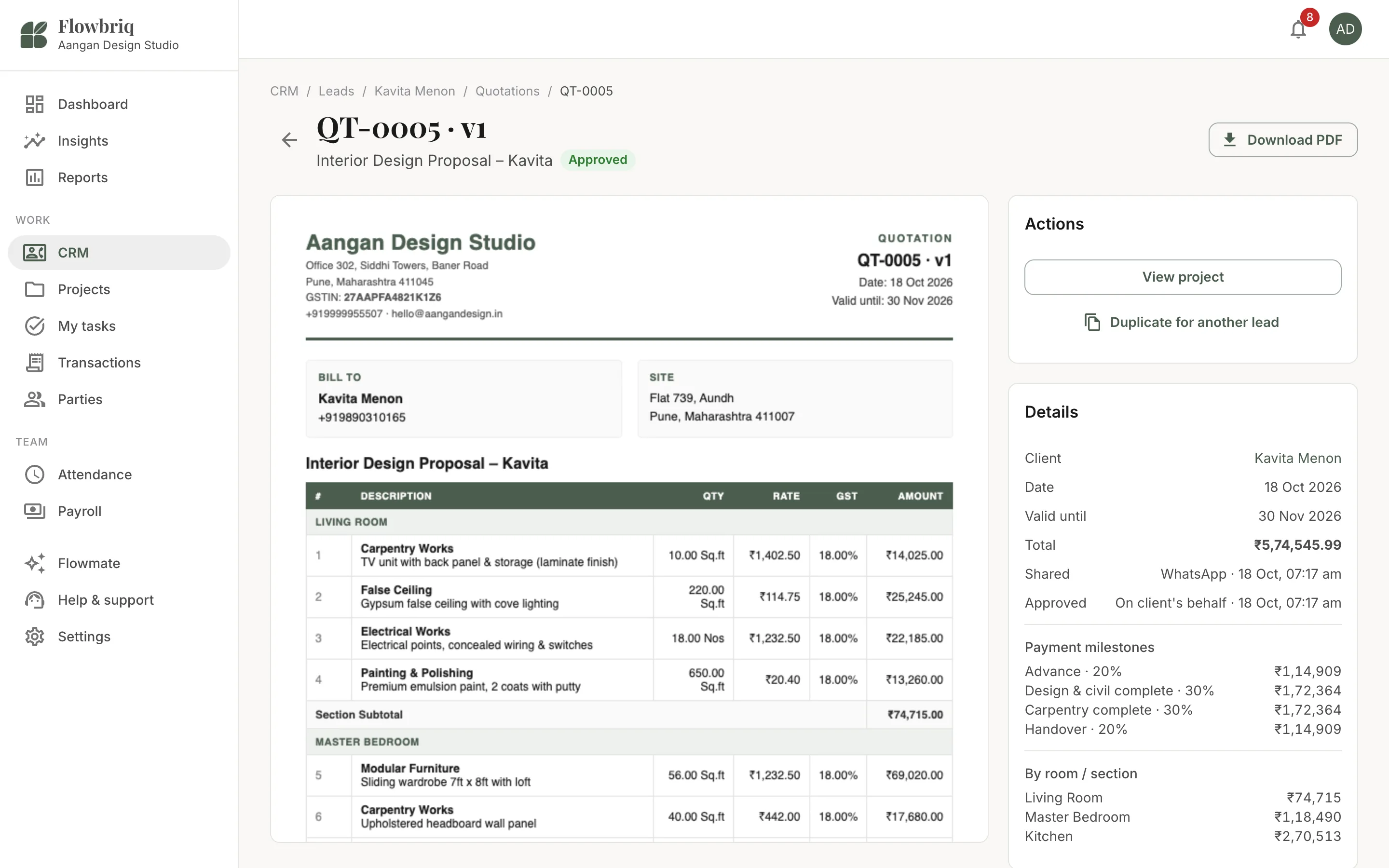
Room-wise quotations your clients can read
Build quotes room by room with GST worked out for you, then share a branded PDF your client can approve.
Rooms, item library and copy from past quotes
Discounts, design fee and payment milestones
CGST/SGST or IGST, amount in words
PDF with your logo, terms, bank details and UPI QR
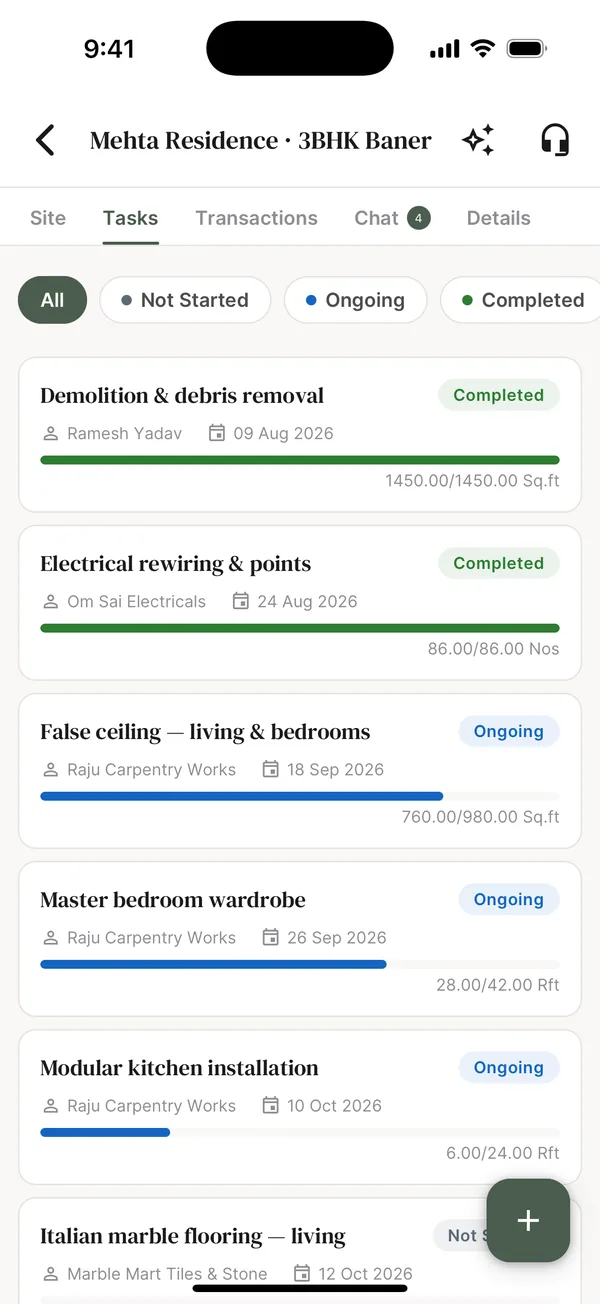
Every project, every task, measurably on track
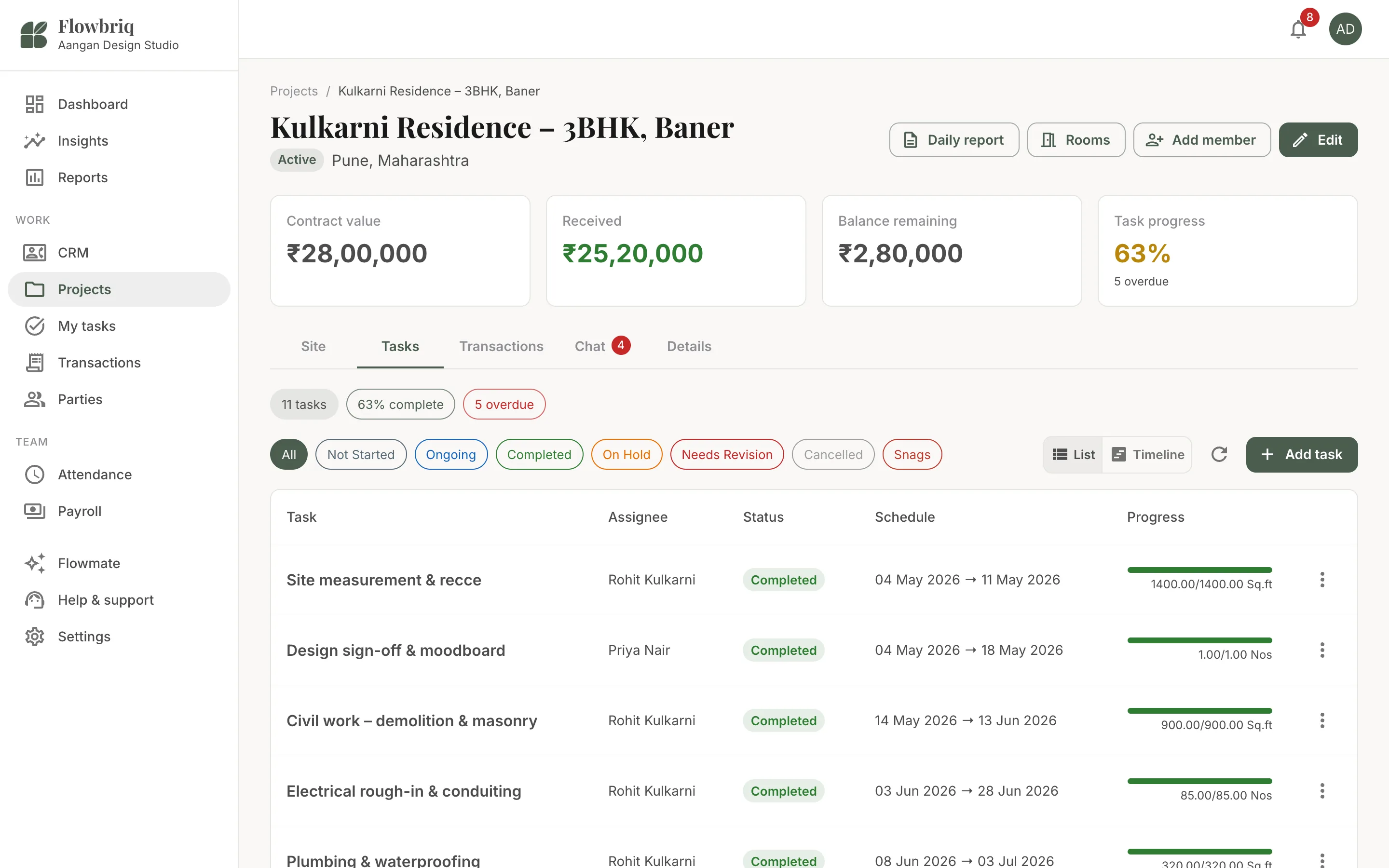
Break each project into tasks and track progress in real units like sq.ft, running feet or pieces, not just "in progress".
Assign tasks to staff or vendors with dates
Progress bars from actual quantities done
Filter by Not started, Ongoing and Completed
Project view with targets, open snags and money in/out
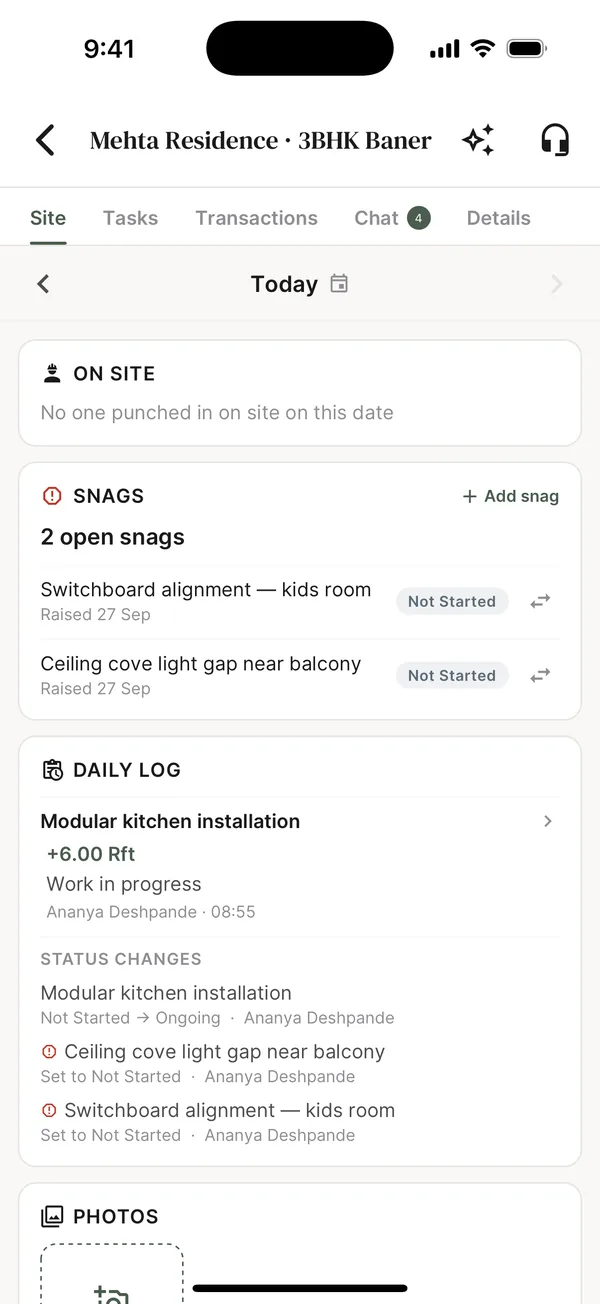
A daily site log your clients actually look at
Know who is on site, what moved today and what is stuck, and send clients a clean daily report in one tap.
Daily log with progress, status changes and photos
Snags with owners and dependencies
Recce by room before work starts
Client and internal daily site report PDFs
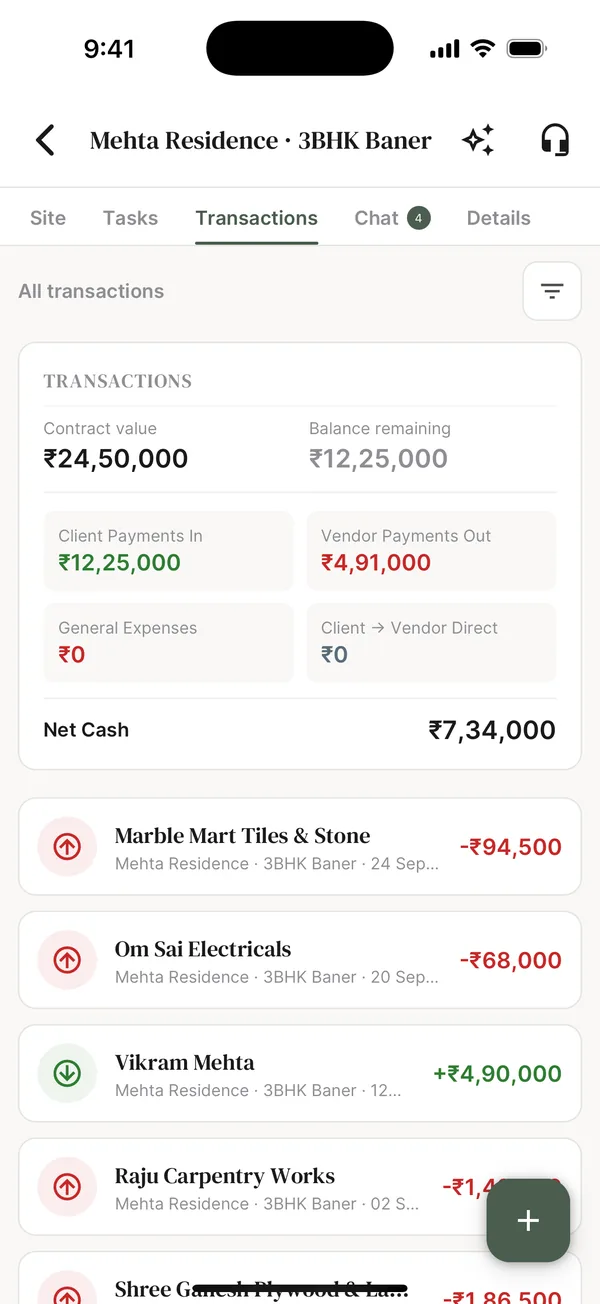
Know your net cash on every project
Client payments in, vendor payments out, general expenses and the balance still to collect, all per project.
Contract value, received and balance remaining
Vendor payouts and direct client-to-vendor payments
Expense categories, petty cash and approvals
Ask Flowmate "who owes me money?"
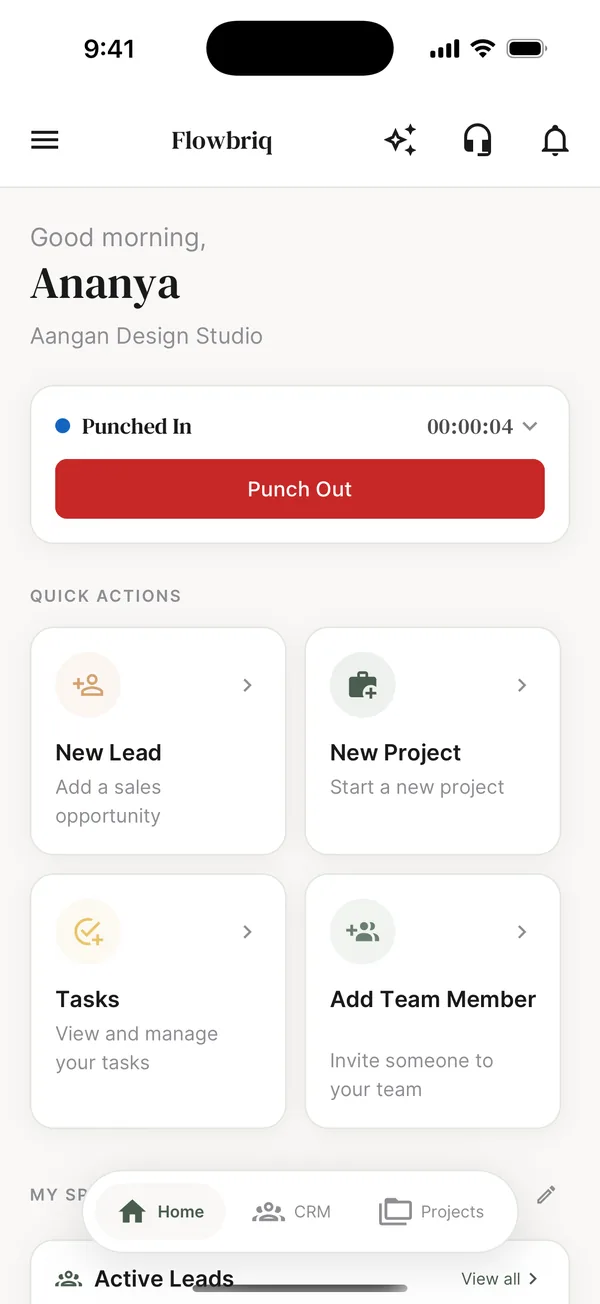
Attendance that checks the site, not just the clock
Staff punch in from the app against the project location, and apply for leave or work from home. On Pro, attendance flows into payroll.
GPS punch-in with a site radius
Leave and work-from-home requests
Payroll with pay structures and adjustments (Pro)
Custom roles and permissions (Pro)
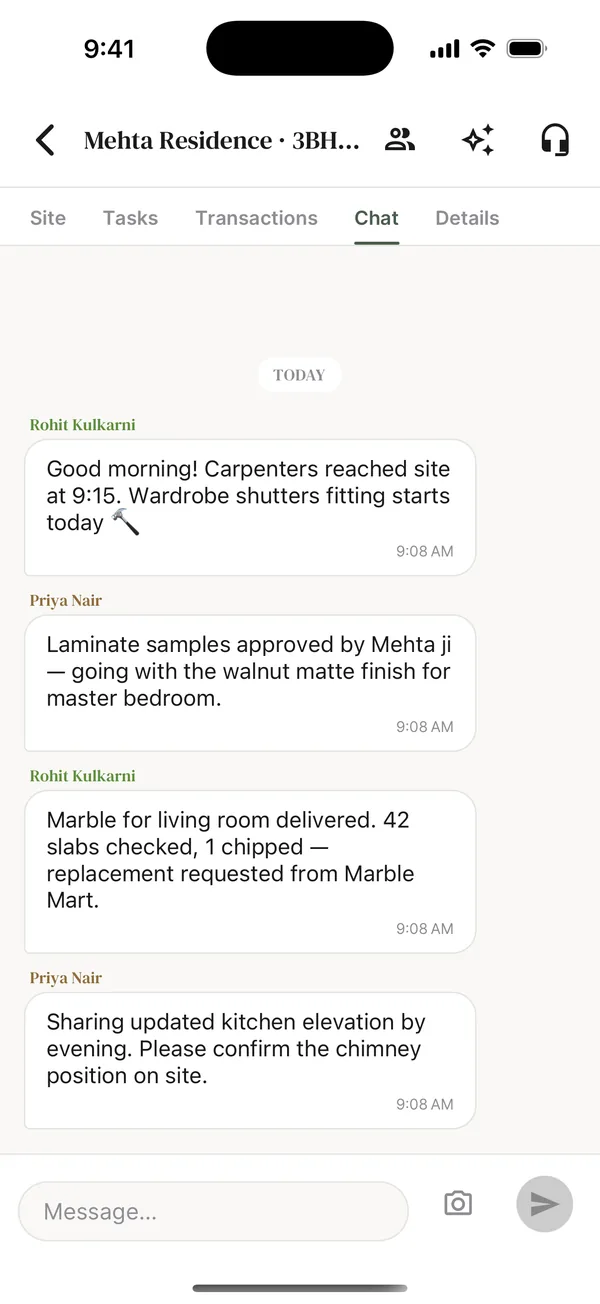
Project chat that replaces the WhatsApp group
Each project has a Team thread and a Client thread, so site chatter and client conversations never mix.
Separate team and client threads per project
Share photos, PDFs and text from WhatsApp into a project
Save chat images straight to site photos
Clients follow progress without seeing staff names
New · FlowBriq on the Web
Your Studio on the Big Screen
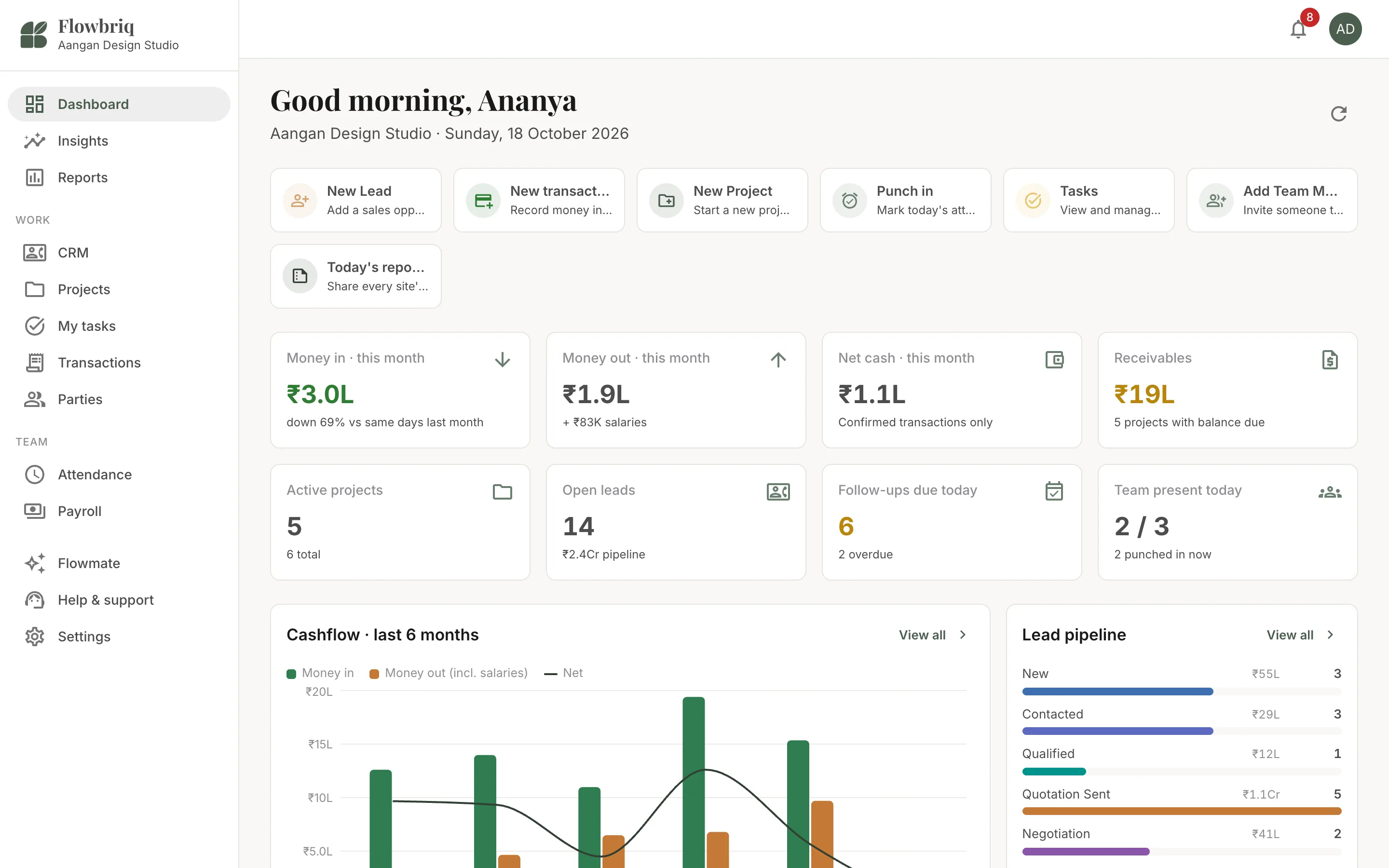
Your team runs sites from their phones. You run the business from your desk, with dashboards, insights and reports that only make sense on a big screen.
app.flowbriq.com
app.flowbriq.com
app.flowbriq.com
app.flowbriq.com
app.flowbriq.com
A dashboard for the whole studio
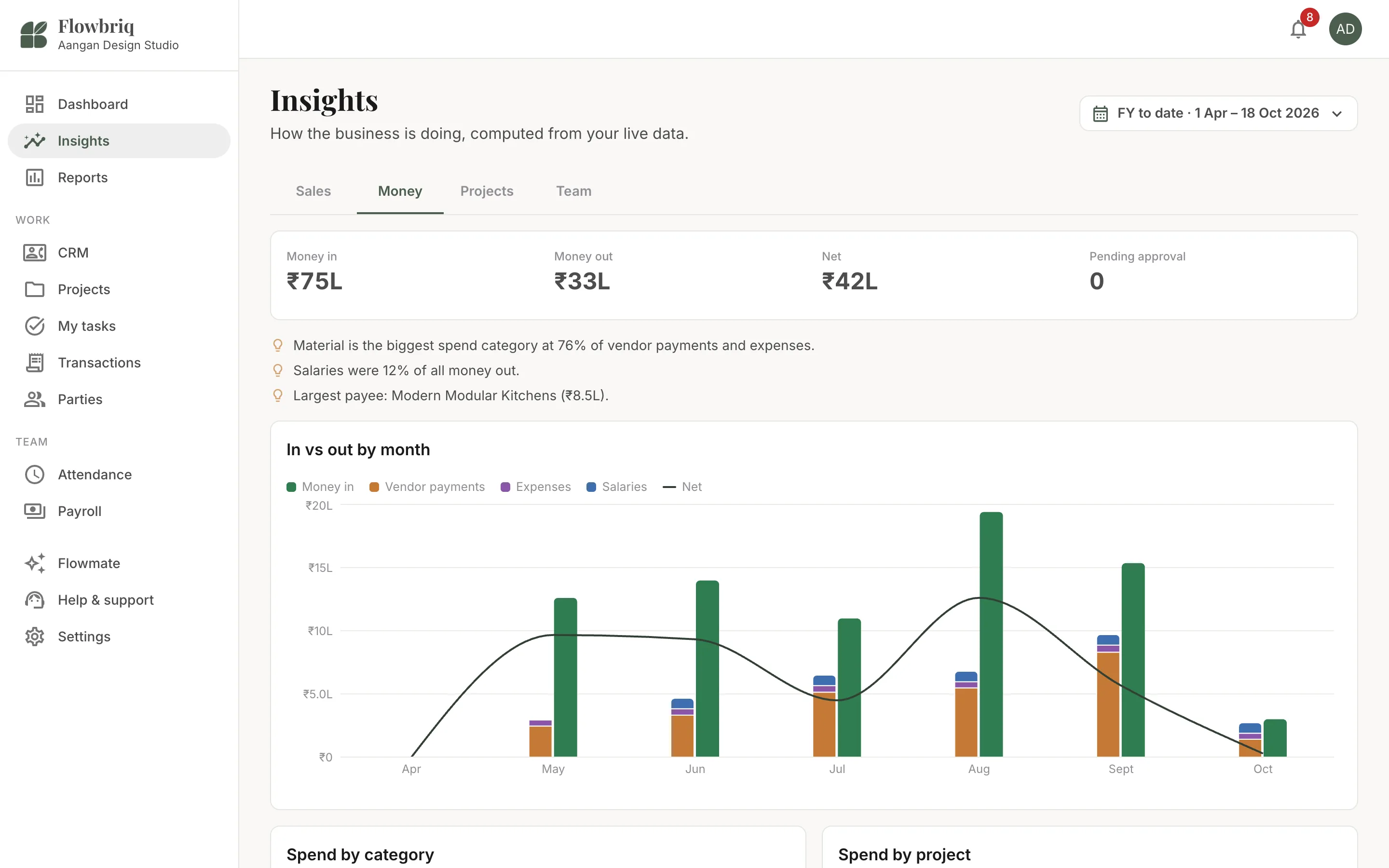
Cash in and out, what clients still owe, open leads, overdue follow-ups and who is on site today, on one screen.
Insights you can act on
Lead funnel and sources, spend by category and project, project P&L and team attendance for any date range.
Reports for your CA
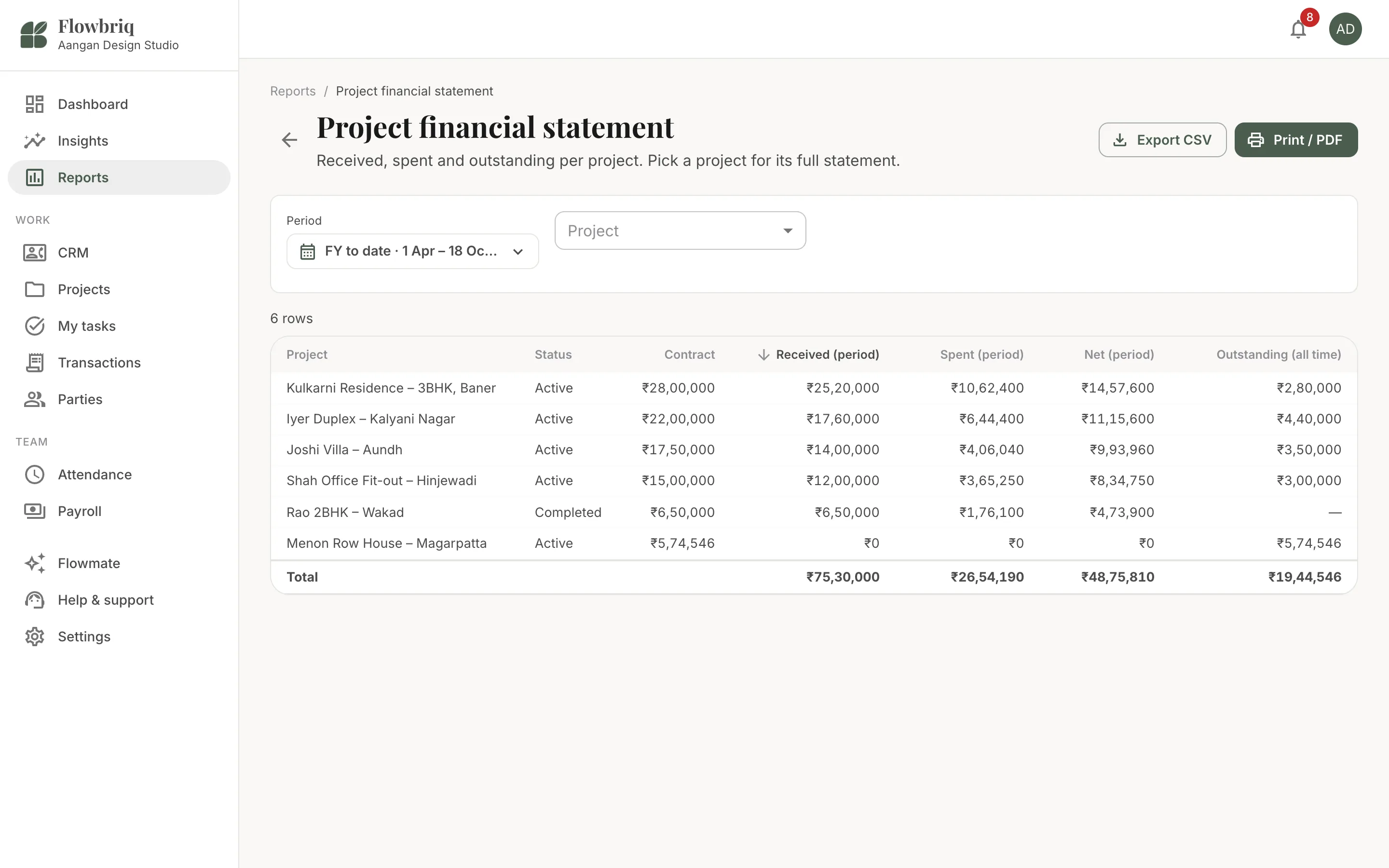
Transactions register, project statements, party ledgers, leads, quotations, attendance and payroll as CSV or PDF.
Same account, same data
Log in with your phone number. Everything your team does on site shows up on your desk instantly, and back.
Any browser, any device
Laptop, desktop, iPad or iPhone. Build quotations and review accounts on a big screen with a real keyboard.
Installs like an app
Add it to your dock, taskbar or Home Screen and FlowBriq opens in its own window.
Add more people than your plan includes, on Studio or Pro.
₹250
/user/month
AI top-up
Add 5,000 Flowmate credits, valid for 30 days.
₹499
one-time
All prices are in Indian Rupees. Prices are final. No GST or other taxes are added at checkout. Your 7-day Pro trial starts when you create your studio in the app or on the web, with no payment needed. To buy or renew, sign in on the billing page with your studio owner phone number; after payment you will be sent back to the app. After the trial, continue on Studio or Pro. The 50% launch discount applies to your first 12 months (monthly) or first year (yearly). Payments are one-time for the period you choose and never renew automatically. If you don't renew, your data stays safe and readable. See our Refund and Cancellation Policy.
Get The App
FlowBriq Is Now Live on Android & the Web.
Run your studio from your phone on site, and from your laptop at the office, with one account. The iPhone app is coming soon to the App Store; until then, use it in Safari at app.flowbriq.com.
FlowBriq is a mobile and web app that runs the day-to-day business of an interior design studio. It brings leads, quotations, projects, tasks, site updates, client and vendor payments, team chat, attendance and payroll into one place, and includes Flowmate, an AI assistant that records work from a single typed message.
Who is FlowBriq for?
FlowBriq is built for interior designers, interior design studios and turnkey interior contractors in India who manage residential and commercial fit-out projects. It is designed around interior workflows such as room-wise quotations, material approvals, site snags and vendor payments, not large civil construction.
What is Flowmate AI?
Flowmate is the AI assistant inside FlowBriq. You type a request in plain English or Hinglish, such as "Mehta ji ne aaj 2 lakh UPI se bheje, record kar do", and Flowmate prepares the payment, lead, task or attendance entry for you. Nothing is saved until you tap Confirm. It can also answer questions like "who owes me money" or summarise a project.
Does Flowmate save anything without my approval?
No. Every action Flowmate prepares appears as a card with Confirm, Edit and Cancel. It is only recorded after you confirm. When details like a phone number or date are missing, Flowmate asks for them instead of guessing.
How much does FlowBriq cost?
The Studio plan is ₹1,499 per month or ₹14,999 per year for the first year (50% off ₹2,999/month or ₹29,999/year). The Pro plan is ₹2,999 per month or ₹29,999 per year for the first year (50% off ₹5,999/month or ₹59,999/year). Prices are final with no taxes added at checkout, and every studio starts with a 7-day free trial of Pro.
How do I buy or renew a plan?
Download FlowBriq, create your studio and start your 7-day Pro trial. When you are ready, use the Buy link on your plan in the pricing section, sign in with your studio owner phone number (one-time OTP), pick Studio or Pro, monthly or yearly, and pay securely online. When payment succeeds your plan is active immediately and you can head back to the app. Only the studio owner can manage billing. Payments are one-time for the period you choose and never renew automatically; see the Refund and Cancellation Policy for refunds.
Is there a free trial?
Yes. Every new studio gets a 7-day free trial of the Pro plan, with all Pro features including payroll, custom roles and Flowmate AI. After the trial, you continue on the Studio or Pro plan at the prices above.
Can I add more team seats than my plan includes?
Yes. Additional seats cost ₹250 per user per month on both the Studio and Pro plans.
What is the difference between the Studio and Pro plans?
Studio includes 5 team seats, 20 clients, 20 vendors and 2,000 AI credits a month, with unlimited quotations, projects, transactions, tasks, site updates and attendance. Pro includes 15 seats, 60 clients, 60 vendors and 6,000 AI credits a month, and adds payroll, custom roles and permissions, and priority WhatsApp support. Extra seats on either plan are ₹250 per user per month.
What are AI credits and what happens if I run out?
AI credits are used each time Flowmate handles a request; longer, multi-step requests use more. The app shows how many credits you have left and what the last reply used. If you need more, an AI top-up adds 5,000 credits for ₹499, valid for 30 days.
Can FlowBriq create GST quotations?
Yes. Quotations support room-wise sections, a reusable item library, discounts, a design fee, payment milestones and CGST/SGST or IGST. You can share a branded PDF with your logo, terms, bank details and a UPI QR code, and keep versions as the quote changes.
Can my clients see project progress?
Yes. Clients can log in to follow their project: daily site logs, photos, snags and the client daily report, plus a dedicated client chat thread. Studio owners control what clients can see through roles and permissions, and internal team names stay hidden from clients.
How does staff attendance work?
Team members punch in and out from the app, and the punch is checked against the site location with a configurable radius. They can also apply for leave or work from home. On the Pro plan, attendance feeds into payroll.
Can I use FlowBriq on my laptop or desktop?
Yes. Open app.flowbriq.com in any modern browser and log in with the same phone number you use on your phone. The web app has everything the mobile app has, plus a studio dashboard, insights on sales, money, projects and team, and reports you can export to CSV or PDF. You can also install it to your dock, taskbar or Home Screen so it opens like an app.
Is FlowBriq available on iPhone?
FlowBriq is live on Google Play for Android. The iOS app is coming soon to the App Store; until then, iPhone users can use FlowBriq in Safari at app.flowbriq.com and add it to the Home Screen.
Is my data safe if I stop my subscription?
Your data is kept safe and readable. You can request a complete, permanent deletion of your account and data at any time from the Delete Account page.
Our Story
Why We Built FlowBriq
FlowBriq was born after working closely with interior design professionals who tried multiple project management platforms but couldn't find one built for the way interior firms actually work.
Most software was designed for construction companies. Interior designers were forced to adapt their workflows instead of using software designed around them.
So we built FlowBriq around the real job: room-wise quotes, client approvals, daily site updates, vendor payments and a team spread across sites. Then we added Flowmate, so the people doing the work can update the app with a single message instead of filling in forms.
Built in India, alongside interior design studios, for interior design studios.
Get in Touch
Let's Talk About Your Studio
Have questions or want a walkthrough? Drop a message - we respond within 24 hours.
Send an Enquiry
Chat with the Founder
Have questions? Chat directly with our founder on WhatsApp and get a response within minutes.